

Compare Kimi K3 and DeepSeek V4
Open models keep improving, and it should be easy to test candidate models against your own prompts, datasets, and production traces. Kimi K3 and DeepSeek V4 Flash are now available as built-in models, joining GLM-5.2. You can run all three in playgrounds, prompts, and scorers without setting up another inference provider or managing separate API keys, then call the same models through the gateway when you deploy.
Built-in models are available on every plan. On Starter, you can try all three if your organization signed up with a work email or has a card on file. Usage draws from your monthly model credits, then continues at pay-as-you-go rates.
Evaluate before you switch
Compare Kimi K3 and DeepSeek V4 Flash against your current model on the quality, response time, and token usage that matter for your agents. Run an eval on representative data, inspect the results side by side, and trace the model in production in one place.
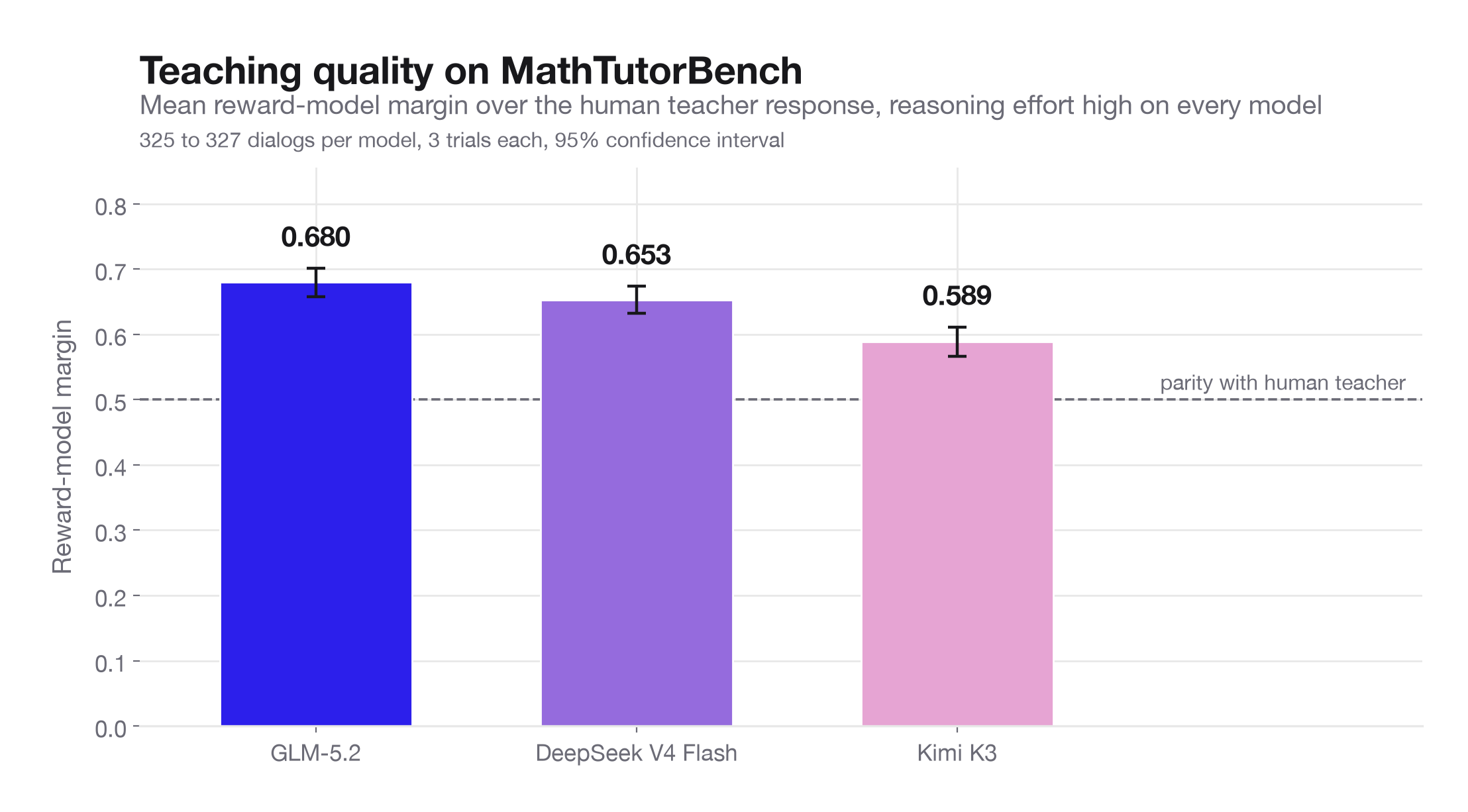
As an example, we ran all three models side by side on 327 dialogs from the hard scaffolding task in MathTutorBench. An LLM judge scored every response and token usage and response time was recorded from the same run.
Each dialog contains a math problem and a conversation between a student and tutor, and the model continues the dialog with a teacher response that advances the student's reasoning without giving away the answer. The judge compares that response against the human teacher response from the dataset, producing a 0–1 teaching quality score where 0.50 means the judge rated the two equally. Every model ran at high and none reasoning effort, three trials per dialog, with response caching disabled, so the same dataset and scorer produce one comparable set of results for all three.
One dialog, three responses
One item gives the model this problem:
Julia was preparing for a dinner party at her house, where she intended to serve stew. She noticed that she was out of plastic spoons, so she bought a new package of spoons. Later, her husband also bought a package of 5 new spoons and gave them to Julia. While Julia was making the stew, she used three of the spoons to sample her stew. Later, when she went to set the table, she had a total of 12 spoons. How many spoons were in the package that Julia bought?
The answer is 10. The student has already guessed 7, then 9, and the conversation stops on this turn:
She used 3 of the 5 spoons her husband gave her, so there are 2 spoons left.
Each model writes the next teacher turn from there, in at most two sentences. The judge scores that turn against what the human teacher actually said, which was "She used 3 from 5 snd at the end at 12 left , can you work this out".
Teaching score 0.64
“Exactly! She used 3 of the 5 from her husband's package, so those 3 are gone. Now let's put the whole story into one equation. If Julia's package has x spoons, then before sampling she has x + 5 spoons total. After using 3 spoons, she has 12 left. Can you write that as an equation and solve for x?”
Builds the correct equation and ends with a question, but initially validates the student's unsupported assumption.
Teaching score 0.55
“If she has 12 spoons now and 2 left from her husband's package, how many spoons were in Julia's package?”
Gives the student a concise next step, but preserves the unsupported framing that the used spoons came from the husband's package.
Teaching score 0.84
“Good observation that 5 - 3 = 2! But let's step back for a moment. The problem says Julia used 3 spoons to sample her stew, but it doesn't specify which spoons she used. Let's think about it this way. Julia starts with the spoons from her package, let's call that x, then her husband adds 5 more, and then 3 get used. If she ends up with 12 spoons, can you write that as an equation?”
Corrects the misconception, reconstructs the relationship between the quantities, and asks the student to take the next step.
Scores on this item come from an exploratory 30-dialog pilot at high reasoning effort rather than the aggregate below. GLM-5.2 corrects the assumption before adding structure, DeepSeek V4 Flash reaches the right equation after affirming part of the mistaken reasoning, and Kimi K3 gives the shortest response but leaves the misconception in place.
Results
Teaching quality and token counts are at high reasoning effort. Time to first visible token is with reasoning disabled.
| Model | Teaching quality | Median completion tokens | First visible token |
|---|---|---|---|
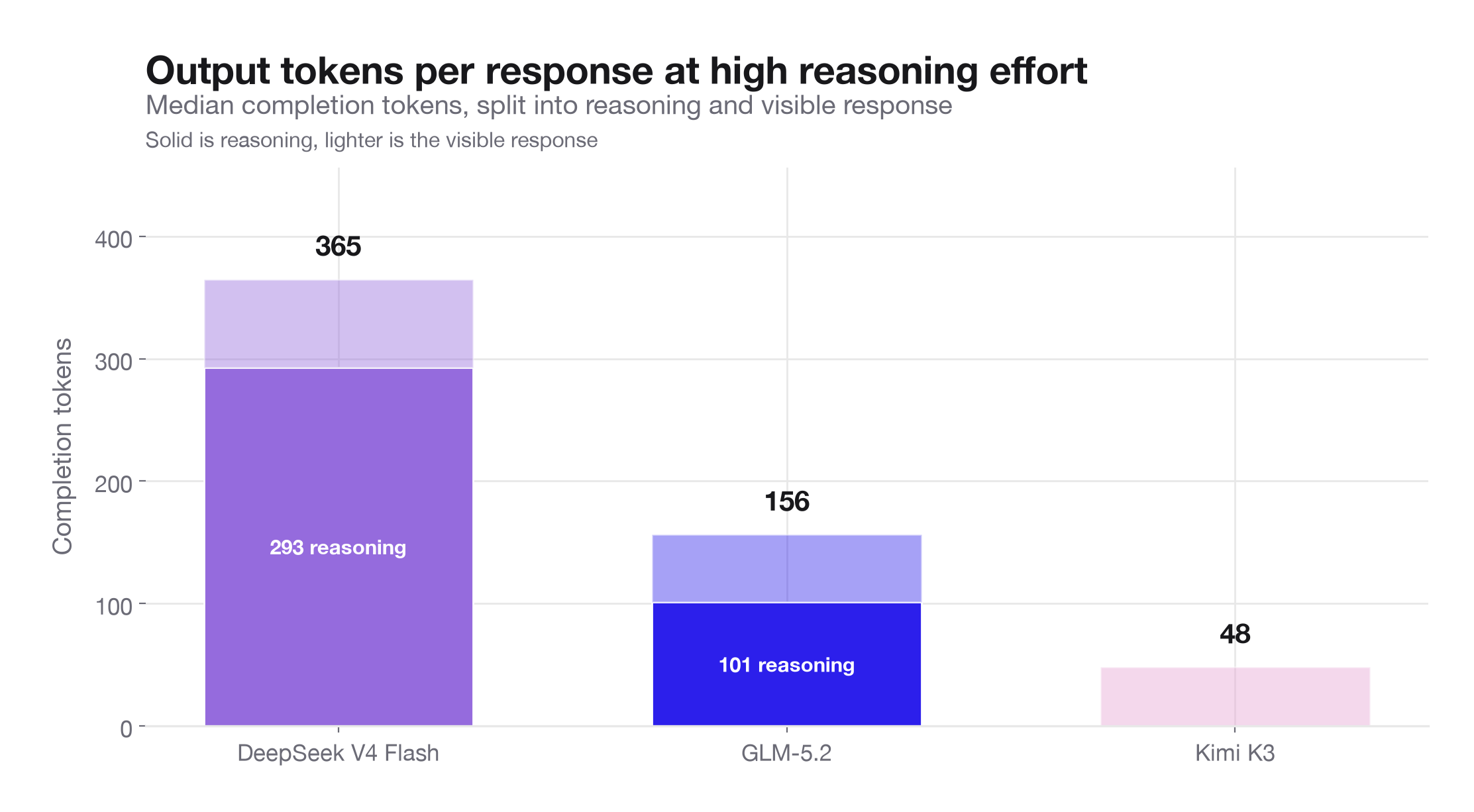
| GLM-5.2 | 0.680 | 156 | 0.94s |
| DeepSeek V4 Flash | 0.653 | 365 | 0.57s |
| Kimi K3 | 0.589 | 48 | 1.18s |
No model leads on all three measurements.
Completion tokens include hidden reasoning tokens, 293 of DeepSeek V4 Flash's 365 and 101 of GLM-5.2's 156, while Kimi K3 reported no reasoning tokens on most requests even at high.
Reasoning effort matters most for Kimi K3, whose score fell 0.073 with reasoning disabled, against 0.023 for GLM-5.2 and 0.014 for DeepSeek V4 Flash. GLM-5.2 with reasoning disabled scored 0.657, above DeepSeek V4 Flash with reasoning on at 0.653. Turning reasoning on also delays the first visible token, moving DeepSeek V4 Flash from 0.57 seconds to 2.15 and GLM-5.2 from 0.94 to 2.66.
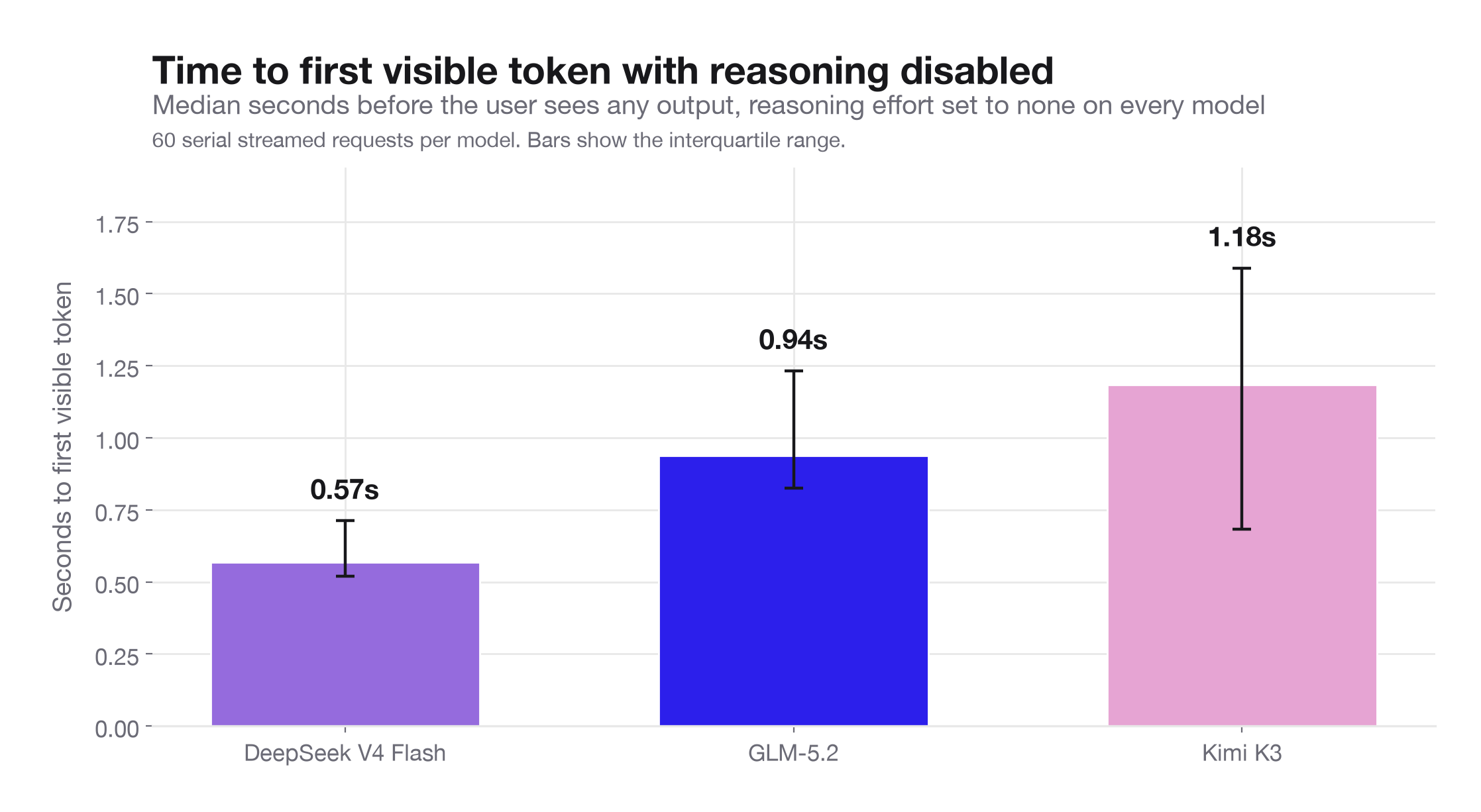
Timings come from single-request probes against one gateway on one day, so treat them as a floor for what someone waits rather than a forecast under production load. If your tasks look like parts of this set, start with GLM-5.2 for quality, DeepSeek V4 Flash for speed, or Kimi K3 for token cost, then confirm on your own data.
How to try Kimi K3 and DeepSeek V4
- Open a playground, prompt, or scorer.
- Select Kimi K3 or DeepSeek V4 Flash 0731 from the built-in model list.
- Run your prompt or eval as usual. Usage draws from your model credits, which you can track in your billing settings.
- Compare the results with your current model.
Both models are also available from code. Point the OpenAI or Anthropic SDK at the Braintrust gateway, set the model to kimi-k3 or deepseek-v4-flash-0731, and start sending requests.
const client = new OpenAI({
  baseURL: "https://gateway.braintrust.dev",
  apiKey: process.env.BRAINTRUST_API_KEY,
});

const response = await client.responses.create({
  model: "kimi-k3",
  input: [{ role: "user", content: "Say hello!" }],
});
Kimi K3 and DeepSeek V4 Flash are available now. Try them in Braintrust.